
Cave Casualties Healing Guide: Wounds, Infection & Meds
Cave Casualties healing explained: stop bleeding, cure infection, calm anxiety, and learn why sleep won't fix open wounds. Pack your meds before you dive.
Jump to
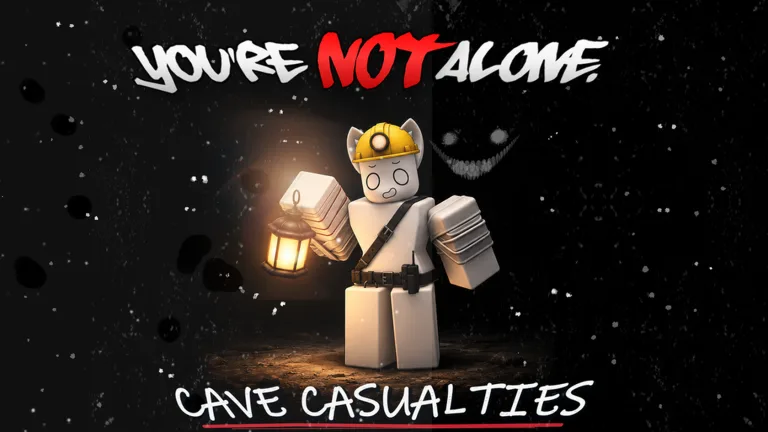
How Healing Works in Cave Casualties
Cave Casualties healing comes down to matching each status to its cure. Bandages stop bleeding and restore HP, Antibiotics clear infection, a Sedative calms anxiety, and an Energy Drink or rest at camp fixes exhaustion. Treat wounds the moment they open. Sleep restores breath, but HP won't return while a wound is open or rotting.
Your own body kills you far more often than the creatures do. That [ CASUALTY ] badge has been handed out 268,549 times for a reason. Keep this chart in your head before every descent:
| Status | What Causes It | What It Does | How to Treat It |
|---|---|---|---|
| Wound | Cave-ins, falls, creature attacks | Steady HP drain, slower movement | Bandage or dressing stops the bleed and restores HP |
| Infection | Untreated wounds, contaminated water | Lower max stamina, periodic damage | Antibiotics, plus a Bandage if the wound is still open |
| Exhaustion | Sprinting, heavy lifting, no rest | Slower stamina regen and interactions | Energy Drink or resting at camp |
| Anxiety | Darkness, isolation, watching teammates go down | Screen distortion, slower item use | Sedative. Keeping your light on slows buildup |
These statuses stack against you. Anxiety slows how fast you use items. That means a panicked diver takes longer to bandage the wound that is already draining them. Fix problems in the order they threaten you. Deal with bleeding first, then infection, then everything else.
Stopping Bleeding Before It Spirals
A wound drains HP continuously and slows you down. It also turns into infection if you leave it. Run the orientation before your first expedition. It lets you practice movement and medical treatment before a real dive.
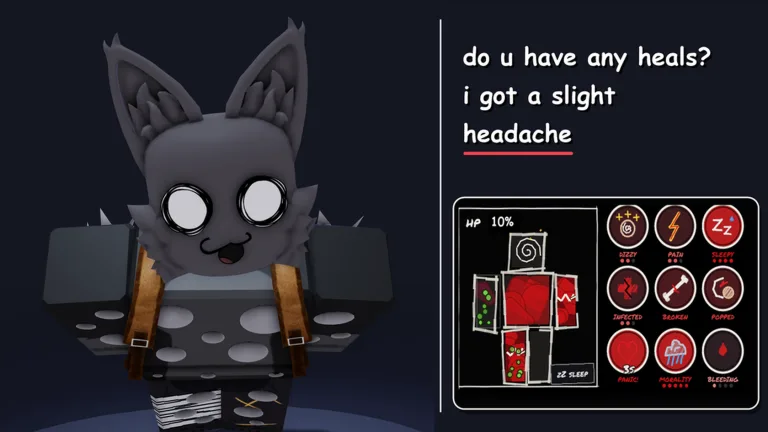 Image: Roblox / Bleedout Interactive
When bleeding starts mid-dive:
- Stop moving if it is safe to do so. Sprinting while hurt also builds exhaustion.
- Inspect your body and find the injured body part.
- Apply a dressing or Bandage to that spot right away.
- Check that the HP drain has stopped before you push on.
Never put off a bandage until you reach the next room. A wound near the surface is cheap to fix. The same wound three layers down, now infected, can end the whole expedition. If you're the medic, keep line of sight on your team so you can reach a bleeding diver fast.
Curing Infection and Avoiding It
Infection lowers your max stamina and deals damage on a timer, and it gets worse the longer it festers. It comes from two places: wounds you didn't treat, and contaminated water.
- Antibiotics clear infection fully. If the original wound is still open, use a Bandage too. Otherwise you are only treating half the problem.
- Only fill your bottle at clean, cold water. Never drink the green water in The Toxic Depths.
- Stay out of contaminated water in the flooded layers unless you are carrying Antibiotics.
The best infection cure is a Bandage applied early. Every wound you close on the spot is an infection that never happens.
Why Sleep Won't Save You
Resting feels like it should fix everything, but it doesn't work that way. Sleeping restores breath. If you have an open or rotting wound, your HP will not come back no matter how long you lie there. Sleep also does nothing to stop an active bleed.
Treat first, then rest:
- Bandage every open wound.
- Take Antibiotics if the wound has started rotting or you are infected.
- Then sleep to recover breath, or rest at camp to shake off exhaustion.
If you sleep with an open wound, you lose time and get nothing back for it.
Packing Medical Supplies
You can pack up to three items before a trip, so every slot counts. A common opening pack is a Medkit, a Lasso, and one of Machete, Pickaxe, or Flashlight. The Medkit covers healing, the Lasso handles rope movement, and the third slot covers defense, digging, or light.
Bandages, splints, and Medkits can be bought or found. Shop at the Supply Booth, or try the cheaper Dealer. Search containers as you descend, because medical loot turns up along the way. The surface camp has a medical stash. The upper caverns have first-aid cabinets worth checking before you drop into the flooded sections.
Scale your kit to how deep you plan to go:
| Target Depth | Medical Loadout |
|---|---|
| Shallow upper-cavern runs | Bandages |
| Flooded tunnels | Bandages + Antibiotics |
| Deep loot runs | Med Kit + spare light |
Before every descent, make sure each player carries at least one Bandage and one Antibiotic. In a group, name a medic who holds the team's spare Bandages and Antibiotics. Then nobody has to dig through their own pack while bleeding out.
The STARTER PACK game pass costs 99 Robux and includes 3 medkits, along with 500 coins, +5 levels, 5 lassos, and cosmetics. Grab it if you want a cushion for your first trips down. If you just want to practice treatment, the PRIVATE SERVER+ pass (299 Robux) lets you spawn medkits and toggle god mode. Progress inside private servers doesn't save, though, so treat it as a training ground.
You can play free on the official Cave Casualties Roblox page.
Knowing When to Turn Back
Set your retreat rules before the lift goes down:
- Turn back when your supplies drop below one full heal per person.
- Turn back the moment any teammate has an untreated infection. An infection festering deep down forces an emergency evacuation anyway, so leave early while it's still cheap.
- Leave dropped gear behind if it's sitting in a creature nest. Recover it on the next run.
To keep your loot, you have to extract alive at a Rescue Capsule, the one with the green light. A full backpack does you no good if you bled out on the way there. If a teammate is down or your medical stock is gone, drop the extra loot and climb.
Continue with
 Cave Casualties Infection Guide: Prevent, Treat, SurviveCave Casualties infection can wreck a deep run fast. Learn what causes it, how to dress wounds, which meds to buy, and when your team should turn back.
More in Injuries
Cave Casualties Anxiety Guide: Stay Calm in the Deep Dark
Cave Casualties anxiety blurs your vision and slows every heal. Learn what triggers it, how light, sedatives, and teammates keep it down, and dive deeper.
Cave Casualties Bleeding: How to Stop Blood Loss Fast
Cave Casualties bleeding can end a dive fast. Learn how to bandage, tie it off, avoid infection, handle amputations, and keep HP climbing while you rest.
Cave Casualties Exhaustion: Stamina, Sleep & Survival Tips
Cave Casualties exhaustion can stall your dive at the worst moment. Learn what drains stamina, how to rest with SLEEP, and how to keep pushing deeper.
Cave Casualties Injuries Guide: Treat Wounds & Infection
Our Cave Casualties injuries guide covers bleeding, infection, exhaustion and anxiety on Roblox. Learn to bandage fast, treat teammates and survive deeper.
Join the community
Official channels for news, updates and player help: